Showing posts with label clutter. Show all posts

Tuesday, June 21, 2011

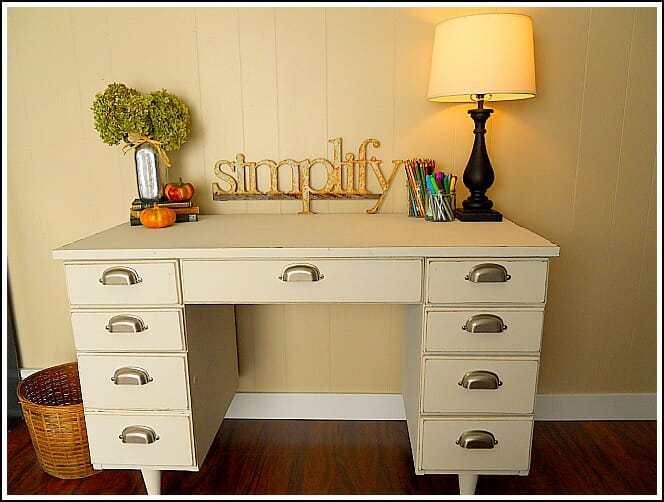
5 Items to Remove From Your Desktop


Flat surfaces seem to be magnets for piles of miscellaneous items.  Kitchen tables, tops of dressers, that chair in the foyer, and even your desk (!) can accrue "stuff" that really doesn't belong there.  Since it's my mission to help people organize their office spaces, here are 5 simple suggestions to help you get started on yours.
Begin by removing unnecessary items from your desktop, such as:
  1. Things you do not use on a daily basis.  Keep the phone, computer, planner, stapler, a couple of pens, etc. but remove the rest.
  2. Junk mail.  If you're not in the habit of sorting through your mail on the day you receive it, then get in the habit!  Immediately throw away any ads, coupons, credit card offers you know you won't use.
  3. Outdated materials.  This includes notes from seminars or meetings, old brochures, ancient business cards, etc.  Anything with an expiration date that's passed, throw it out!
  4. Knick-knacks and other companies' promotional items.  I know, you need the stress ball with your insurance agent's logo on it, but do you really need 6 of them?  I think not.  The ceramic angel you don't want to get rid of because your co-worker gave it to you 2 Christmases ago--remove it from your desktop!  You probably don't even like angels.
  5. And finally, trash.  So obvious, I know, but I wouldn't have this on the list if it wasn't happening.  Don't leave empty candy and snack wrappers on your desk.  Throw away the mostly empty Starbucks cup from last week.  Same goes for any half-eaten food (ick.).  Throw the trash away.
Take a moment to really look at your desktop now.  Are there any of the items from the list on it?  A cleared off desktop is a wonderful thing!  There will be less to distract you so you can focus on doing your best at work.  Short on time?  Tackle one of these a day and you'll have a "new" desk in only 5 days!  Get started, and good luck.

Friday, May 13, 2011

5 Quick Tips to Declutter Your Office

Clutter. Ick. How does it appear, and why can't we seem to get rid of it once and for all?  We can!  With these tips and a bit of discipline (try it, it's not so bad), we can learn to control clutter and maintain a neat and orderly office space. 
  1. Tackle one small area at a time.  Start with a desk drawer, or even a section of it.  The benefits of starting small are twofold: working on a small space allows you to see results instantly, and the time commitment is minimal.  Ten minutes here and there adds up.
  2. Organize when you clean.  Cleaning and organizing are not the same, although the two are sometimes lumped together.  While you're dusting is a great opportunity to toss out or relocate items that are no longer useful to you, or that have strayed from their assigned home.  Putting things where they belong not only helps you get organized, it's less you have to dust around.  Yay!
  3. Purchase organizing products only if you know what you're going to use them for.  Yes, I too have been guilty of buying a tool at Office Max not because I really needed it, but because it was so cute!  Stop that.  I have broken myself of this habit, so don't convince yourself that the pretty box with the beach scene will solve your organizing challenges.  The only way to solve them is to declutter your space and implement a system that is simple and logical for you.
  4. Don't be shy about using empty wall space or the back of your office door for storage of items you use but don't need to access every day.  Look in office supply stores and online for a myriad of choices in this area.  It's ok to keep items if you use them--this is not clutter, but make sure each item has a permanent home in your office.
  5. Set aside time each day to declutter until it's done.  Don't be tempted to dump stuff into a box in the corner of your office in the hopes that you'll get to it soon.  No, you probably won't.  The best way to declutter is to start small (see Tip #1!) and to keep going until you're happy with your space.


Tuesday, March 8, 2011

Update Your Organizing Systems


Once you're "organized", it's an ongoing process that takes minimal daily maintenance.  However, if you find that some of the systems you've set up are not really helping you in your organizing endeavors, then you may need to make some adjustments.  This is fine!  I have to do this myself, and I find that as life gets busier I need to fine-tune things in my office occasionally. 
Over the weekend I did this.  I moved my filing cabinet from one corner to another (I can still reach it from my office chair), I removed everything from my desktop and put back only the items I really need on it, and I moved my whiteboard and large calendar to a more accessible place on the wall close to my desk.  Now I won't forget to write things down, darnit!  I also hung up some pretty pictures to inspire me...don't forget to include the little things that make a huge difference. 
Austria,blossoms,clouds,crocuses,European Alps,flowers,growths,idyllic,iStockphoto,landscapes,meadows,nature,North Tirol,outdoors,Photographs,spring

Friday, March 4, 2011

Organize For Tax Time

April 15th,calendars,documents,government,income taxes,Photographs,tax forms,taxes,texts

It's possible you know someone who highly dreads this time of year.  Tax time.  Even though, like Christmas, it happens at the same time every year, some of us are usually still caught off guard.  What--I have to gather my receipts, update my mileage log, balance months of bank statements...already? Again?  Crap.  (Kinda like I am around the holidays--already? Again? Crap.)

Anyway, if your filing system for tax documents consists of a pile of papers stacked somewhere in your office, here are a few tips to make this year's tax time a little less painful.  Hopefully next year's, too.
  • Systematically go through the papers and receipts and sort into relevant piles.  Different categories will emerge, so put like with like.
  • Create a folder for each category: Income, Expenses, Receipts, Records (or use words that make sense to you so you'll know what goes in the folders and you'll use them)
  • I suggest paper clipping together each month's papers inside of each folder--this way, if you need to find info for a certain month, you can do so quickly without having to rifle through the folder
  • If you have an accountant that you'll be giving your info to, go ahead and add up the items in each category.  He/she will double-check your numbers anyway, but this can be a time saver for them.
  • Throughout the year, use these folders!!  Don't make your life harder by procrastinating on this one. 
 You'll thank yourself next year at tax time, and you'll wonder why you waited so long to organize your tax documents!

Monday, February 28, 2011

Do You Need An Inbox?

Yes!  Many clients I work with either don't have one, or if they do, it's misused as yet another place to stack papers they're not sure what to do with.  Some inbox tips:
  • It should live on your desktop.  It doesn't matter if it's on the corner or in the center--it just needs to be within arm's reach.
  • Its main purpose is for gathering papers, reminders, notes from meetings, daily mail, and other info that isn't urgent, but that needs to be processed (filed, delegated, acted upon, trashed) in some way soon. 
  • You must clean it out at least once a week!  That's the hard part for most folks.  But you defeat the purpose of the inbox if you just let stuff sit there.  Discipline yourself to make time each day or so to decide what needs to be done with each item in your inbox.  You'll notice an increase in your productivity--I promise!
Inboxes can be plastic trays or wicker baskets or even the lid of a cardboard box.  Whatever will work for you--just use one!  Here are some pretty ones from www.seejanework.com .

Friday, November 12, 2010

Reduce Your Paper Output

Often the biggest contributor to office clutter and chaos is paper.  What should you do with it all?  Where does it come from, anyway?  Aside from engaging the help of a wonderful professional office organizer (!) to assist you with your paper struggles, there are ways that you can decrease your own paper output.  Decreasing paper output not only helps you, but you'll also be doing others a huge favor by producing less paper clutter for them.

Quick paper reducing suggestions:
  • Think before you print!
  • Send copies of documents to fewer people.
  • Reduce the number of office forms.
  • Call to reply to someone if a letter/memo is not necessary.
  • Email (although too many emails is another big issue for folks...think before you email, too).
  • If you must write and send on paper, keep it brief.
Going "paperless" is not an option for everybody, but most people can find small ways to use less paper and reduce their struggle with having too much of it.  Less paper...less stress!